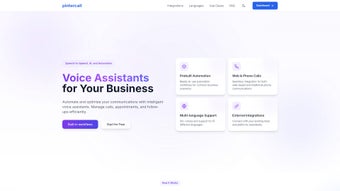

Download Pintercall – AI‑Powered Voice Generator for Lead Management
Overview: Why Pintercall Is Changing the Way Businesses Talk to Leads
In a market where speed and personalization are the twin engines of sales growth, Pintercall arrives as a game‑changing, AI‑driven voice generator that automates the most time‑consuming part of the sales funnel – outbound calls. Built as a web‑based application, Pintercall leverages cutting‑edge Voice AI to understand natural language, respond with human‑like intonation, and adapt its script in real time based on the prospect’s answers. This means a sales team can launch hundreds of follow‑up calls, appointment‑setting conversations, or order confirmations without hiring additional agents or sacrificing the personal touch that builds trust.
The platform integrates seamlessly with major CRM systems such as Salesforce, HubSpot, Zoho, and Microsoft Dynamics, pulling lead data directly into the call queue and pushing call outcomes back into the CRM. This closed‑loop workflow eliminates manual data entry, reduces human error, and frees up reps to focus on high‑value activities like closing deals. Pintercall also supports multi‑language processing, allowing global teams to reach prospects in their native tongue while maintaining compliance with regional data‑privacy regulations.
From a cost perspective, the solution is positioned as a subscription‑based service with tiered pricing that scales with call volume, making it affordable for startups and large enterprises alike. The platform’s security model includes end‑to‑end encryption, role‑based access control, and regular third‑party audits, ensuring that sensitive lead information stays protected. In short, Pintercall delivers a reliable, secure, and cost‑effective way to supercharge telecommunication efforts across sales, marketing, customer service, and even order processing teams.
Key Features & Benefits
- AI Voice Generation: Real‑time, natural‑sounding speech that mimics human cadence and emotion.
- CRM Integration: Native connectors for Salesforce, HubSpot, Zoho, Microsoft Dynamics, and custom APIs.
- Multi‑Channel Outreach: Automated calls for follow‑ups, appointment setting, surveys, and order confirmations.
- Dynamic Script Engine: Scripts adapt on the fly based on prospect responses, improving conversion rates.
- Multi‑Language Support: Over 20 languages and regional accents to serve global audiences.
- Call Analytics Dashboard: Real‑time metrics, call recordings, sentiment analysis, and performance insights.
- Compliance & Security: GDPR, CCPA, and ISO‑27001 compliance with end‑to‑end encryption.
- Scalable Pricing: Pay‑as‑you‑go model with volume discounts for high‑call businesses.
- Custom Voice Branding: Upload brand‑specific voice profiles to maintain a consistent auditory identity.
- AI‑Driven Lead Scoring: Predictive scoring based on call outcomes and engagement patterns.
Each of these features is designed to address a specific pain point in the lead management lifecycle. For example, the Dynamic Script Engine reduces the “one‑size‑fits‑all” problem by tailoring conversation flow, while the Call Analytics Dashboard gives managers a granular view of agent performance without the need for manual reporting. The platform’s ability to sync with existing CRMs means that teams do not need to overhaul their tech stack – a crucial benefit for organizations that have already invested heavily in sales automation tools. Moreover, the security and compliance suite ensures that businesses can adopt Pintercall without risking regulatory penalties, a common concern when handling voice data across borders.
Installation, Setup & System Compatibility
Because Pintercall is a cloud‑native web application, the installation process is dramatically simpler than traditional on‑premise telephony systems. Users begin by creating an account on the official website, choosing a subscription tier that matches their expected call volume, and then confirming their email address. Once logged in, a guided onboarding wizard walks administrators through three core steps: connecting a CRM, uploading a lead list, and configuring call scripts.
Step‑by‑step installation:
- Visit pintercall.com and click “Start Free Trial”.
- Enter business details, select a payment plan (or opt for the 14‑day free trial), and verify your email.
- Navigate to the “Integrations” tab and click “Add CRM”. Choose from the pre‑built connectors or use the REST API for custom integrations.
- Upload a CSV of leads or allow the CRM connector to sync contacts automatically.
- Use the visual script editor to craft call flows; you can also import pre‑made templates.
- Set call schedules, assign voice personas, and enable compliance settings such as Do‑Not‑Call lists.
- Run a test call to ensure audio quality and script accuracy, then go live.
Pintercall runs on any modern browser (Chrome, Edge, Firefox, Safari) and requires no additional software downloads, making it compatible with Windows 10/11, macOS Monterey and later, as well as Linux distributions that support the latest browsers. For mobile teams, the platform offers responsive web access on Android 8.0+ and iOS 13+, ensuring that field agents can monitor call performance from tablets or smartphones. The service also supports single‑sign‑on (SSO) via SAML 2.0, OAuth, and Azure AD, streamlining user provisioning for enterprises.
Final Verdict: Pros, Cons, FAQ and How to Get Started
Pros
- AI voice sounds natural, improving prospect engagement.
- Deep CRM integrations eliminate manual data entry.
- Scalable pricing model suits both SMBs and large enterprises.
- Comprehensive compliance and security features protect sensitive data.
- Multi‑language support expands reach to global markets.
Cons
- Initial script setup may require a learning curve for non‑technical users.
- Internet connectivity is critical; poor bandwidth can affect call quality.
- Advanced analytics are only available on higher‑tier plans.
Frequently Asked Questions
Can Pintercall handle inbound calls as well as outbound?
At present, Pintercall focuses on outbound automation. However, the platform can route inbound calls to human agents or trigger AI‑driven responses based on pre‑defined rules.
Is there a free trial available?
Yes, new users can start a 14‑day free trial with full access to all core features, allowing you to evaluate call quality and integration capabilities before committing.
How does Pintercall ensure GDPR compliance?
The platform provides built‑in consent management, data‑encryption at rest and in transit, and tools to delete or anonymize call recordings on request, meeting GDPR and other regional regulations.
What kind of support is included with the subscription?
All paid plans include 24/7 email support, live chat during business hours, and access to an online knowledge base. Enterprise tiers receive a dedicated account manager and priority phone support.
Can I customize the AI voice to match my brand’s tone?
Yes, Pintercall offers custom voice branding where you can upload voice samples or select from a library of tonal profiles to align the AI voice with your brand identity.
Conclusion & Call to Action
If you’re looking for a secure, AI‑powered solution that turns tedious cold‑calling into a scalable, data‑rich process, Pintercall delivers on every promise. Its seamless CRM integration, natural‑sounding voice engine, and robust compliance framework make it a standout choice for sales, marketing, and customer service teams that need to accelerate outreach without sacrificing quality. Start your free trial today, configure a few simple scripts, and watch how automated conversations can boost lead conversion rates while freeing your human talent to focus on closing deals.



.png)



